
Free Broken Link Checker Online Tool
Find Dead Links, 404 Errors & Broken URLs Instantly
Scan webpages or entire websites to detect broken links, dead URLs, redirect issues, and 404 errors. Improve SEO, user experience, and website health with our free online broken link checker tool.
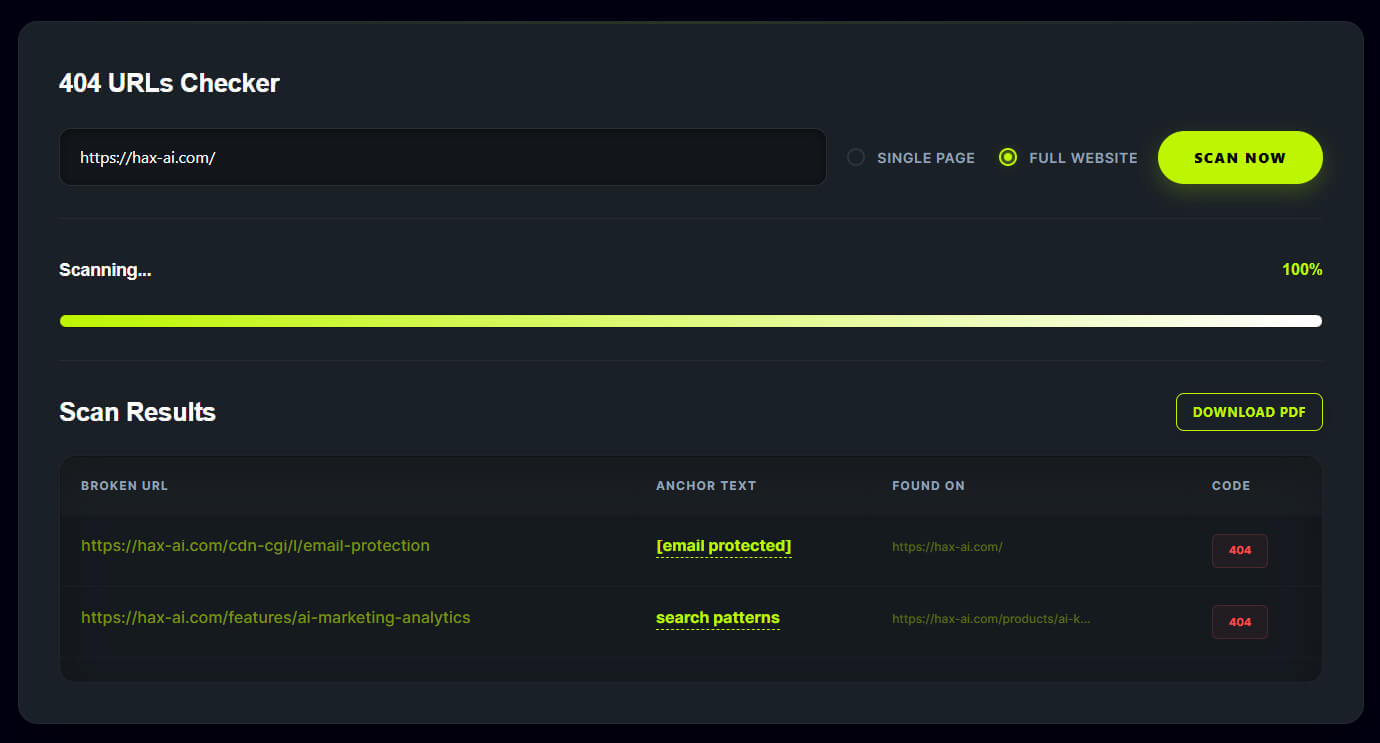
404 URLs Checker
Scanning...
0%Scan Results
Download Report
Enter your details to receive the report via email.
Detect Broken Links & Improve Website SEO
What Is a Broken Link Checker?
A broken link checker helps you find dead URLs, 404 pages, and invalid internal or external links on your website. Regular link audits improve user experience, website crawling, and overall SEO performance.
A broken link checker is an online SEO tool that scans webpages and websites to identify invalid, dead, or broken URLs. These links usually return errors such as 404 Not Found, 500 Internal Server Error, DNS failures, redirect loops, or inaccessible pages.
Broken links can negatively affect:
- user experience
- search engine crawling
- website trust
- SEO rankings
- conversion rates
A website link checker helps website owners quickly detect these issues and fix them before they impact visitors or search engine visibility.
Our free broken link checker tool allows you to scan webpages or entire websites to identify broken internal links, dead external links, redirect issues, and missing pages instantly.
Why Broken Links Are Bad for SEO
Broken links are one of the most common technical SEO issues found on websites. Search engines like Google use links to crawl and understand site structure. When links are broken, crawlers may waste crawl budget and users may leave your website after encountering errors.
Problems Caused by Broken Links
Poor User Experience
Visitors clicking on a dead link often land on a 404 error page. This creates frustration and increases bounce rate.
Reduced Search Engine Crawling
Search engine bots may stop crawling certain sections of your website if too many broken pages exist.
Lost Link Equity
Internal links help distribute SEO authority across your website. Broken links interrupt that flow.
Lower Website Trust
Dead pages can make a website appear outdated or poorly maintained.
Impact on Conversions
Broken checkout pages, forms, or product links can directly reduce sales and leads.
Using a broken link finder regularly helps prevent these issues and improves overall website health.
Types of Broken Links
Internal Broken Links
These are links pointing to pages within your own website that no longer exist.
Example:
- deleted blog posts
- changed URLs
- missing pages
- incorrect slugs
External Broken Links
These links point to external websites that may have:
- expired domains
- deleted pages
- server issues
Broken Images
Image URLs may return 404 errors when files are removed or renamed.
Redirect Chains and Loops
Too many redirects or incorrect redirect configurations can also create crawling problems.
How Our Broken Link Checker Works
Our online broken link checker scans URLs and analyzes HTTP responses to identify issues.
The tool checks:
- internal links
- external links
- redirect responses
- HTTP status codes
- inaccessible pages
- dead URLs
Supported HTTP Status Codes
| Status Code | Meaning |
|---|---|
| 200 | Working page |
| 301 | Permanent redirect |
| 302 | Temporary redirect |
| 403 | Forbidden |
| 404 | Page not found |
| 500 | Server error |
| 503 | Service unavailable |
The scanner quickly reports problematic URLs so you can fix them efficiently.
Features of Our Website Link Checker
Free to Use
No registration or installation required.
Fast Website Crawling
Analyze webpages and websites quickly.
Detect Internal and External Links
Find issues across your entire site structure.
404 Error Detection
Instantly identify dead pages and broken URLs.
SEO Friendly Reports
Understand which links impact search engine optimization.
User-Friendly Interface
Simple scanning process for beginners and professionals.
Website Health Monitoring
Keep your website clean and optimized.
Benefits of Using a Broken Link Checker
Improve Technical SEO
Fixing broken links improves crawlability and indexation.
Better User Experience
Visitors can navigate your website smoothly.
Preserve SEO Authority
Internal links help pass ranking signals effectively.
Reduce Bounce Rate
Working links improve engagement and session duration.
Maintain Website Quality
Healthy websites build more trust with users and search engines.
Broken Links and Google Rankings
Google considers user experience and technical website quality when ranking pages. While a few broken links may not destroy rankings, excessive dead links can indicate poor maintenance.
Broken pages can:
- waste crawl budget
- reduce page quality
- affect internal linking structure
- hurt user trust
A regular website link audit helps maintain strong SEO performance.
Common Causes of Broken Links
Deleted Pages
Pages removed without redirects create 404 errors.
URL Changes
Changing slugs without updating links causes broken URLs.
Domain Expiration
External websites may expire or become inactive.
Incorrect Link Formatting
Typos in URLs often lead to inaccessible pages.
Migration Errors
Website redesigns and CMS migrations commonly create broken links.
How to Fix Broken Links
Update Incorrect URLs
Correct invalid or outdated links.
Add 301 Redirects
Redirect old pages to relevant new pages.
Replace Dead External Links
Update references to working sources.
Restore Missing Content
Recreate important deleted pages if needed.
Remove Unnecessary Links
Delete irrelevant or outdated links.
Internal Link Checker for SEO
Internal links help search engines discover and prioritize content. A broken internal link checker identifies issues within your own website structure.
Benefits:
- improved crawlability
- stronger site architecture
- better keyword relevance
- enhanced page authority distribution
Strong internal linking is essential for technical SEO success.
External Link Checker
External links connect your content with valuable resources and references. However, external pages may become unavailable over time.
Our tool helps identify:
- dead outbound links
- expired domains
- inaccessible external resources
Keeping outbound links updated improves trust and content quality.
Website 404 Checker
404 errors occur when requested pages cannot be found on the server. These errors are common after:
- page deletions
- permalink changes
- site migrations
A website 404 checker helps detect these issues before they affect visitors and rankings.
Why Website Maintenance Matters
Regular website maintenance improves:
- SEO performance
- page speed
- crawl efficiency
- user experience
- website reliability
Checking for broken links should be part of every technical SEO strategy.
Who Should Use This Tool?
Bloggers
Maintain healthy blog structures and references.
SEO Professionals
Perform technical SEO audits efficiently.
Businesses
Improve customer experience and conversion rates.
Developers
Detect invalid URLs during website updates.
Agencies
Monitor client websites for technical issues.
Best Practices for Broken Link Management
Run Regular Website Audits
Scan your website frequently.
Monitor Redirects
Avoid unnecessary redirect chains.
Check External References
Update old citations and resources.
Use Clean URL Structures
Organized URLs reduce linking problems.
Improve Site Architecture
Logical navigation supports better crawling.
Broken Link Checker vs Manual Checking
Manually checking links is time-consuming and inefficient for large websites. Automated link checkers provide:
- faster scanning
- complete reports
- accurate status detection
- better scalability
For websites with hundreds or thousands of pages, automation is essential.
Common SEO Issues Related to Broken Links
Broken links are often connected with:
- crawl errors
- orphan pages
- redirect loops
- duplicate pages
- weak internal linking
- poor navigation
Fixing these issues improves overall technical SEO quality.
How Often Should You Check for Broken Links?
Recommended frequency:
- small websites: monthly
- blogs: every 2–4 weeks
- ecommerce sites: weekly
- enterprise websites: daily monitoring
Frequent audits help prevent SEO and usability problems.
Technical SEO and Link Health
Healthy links are an important part of technical SEO. Search engines rely on links to:
- discover pages
- understand structure
- distribute authority
- evaluate content relevance
Broken links interrupt this process and reduce crawling efficiency.
Improve Website Trust and Authority
Users trust websites that function properly. Broken pages create frustration and reduce credibility.
Maintaining healthy links helps:
- improve brand trust
- increase engagement
- support SEO visibility
- enhance website professionalism
Quick Answers to Common Questions
Frequently Asked Questions
Find answers to common questions about HAX-AI, including keyword research, AI insights, pricing, and traffic growth strategies.
What is a broken link?
A broken link is a URL that no longer works or returns an error page such as 404 Not Found.
Why are broken links bad for SEO?
Broken links hurt user experience and reduce crawling efficiency, which can negatively impact rankings.
Can I scan an entire website?
Yes. Our tool supports scanning individual pages and full websites.
How do I fix broken links?
You can update URLs, add redirects, restore deleted pages, or remove invalid links.
What is a 404 error?
A 404 error means the requested page could not be found on the server.
How often should I check my website for broken links?
Regular scans are recommended, especially after redesigns, migrations, or content updates.
Does this tool check internal and external links?
Yes. The tool detects both internal and outbound broken links.
Is this broken link checker free?
Yes. Our online broken link checker is completely free to use.
Conclusion
Broken links can silently damage SEO performance, user experience, and website trust. Regular website audits help identify dead URLs, 404 pages, redirect issues, and broken internal or external links before they become major problems.
Our free broken link checker tool helps website owners, SEO professionals, agencies, and developers quickly scan websites and detect issues efficiently. By maintaining healthy links and improving technical SEO, you can create a better experience for both users and search engines.
Lifetime Access to AI-Powered Keyword & SEO Tools
A select set of HAX-AI’s features are yours for a lifetime—no subscription required! Easily find high-ranking keywords, build your initial SEO strategy, and kickstart your growth at zero cost.